Phases of the Moon Pro
- 3.5
- Rating
- 50.00K
- Installs
- $1.99
- Price
 Analysis by App-foxy
I usually open a weather app to decide whether I need a jacket, but Phases of the Moon Pro answers a different kind of everyday question: what the Moon is doing tonight, and how that fits into a longer lunar cycle. After spending time with it, I see it less as a replacement for a full forecast and more as a focused moon-watching tool with a visual, always-available feel.
That distinction matters before you pay for it. This is a weather-category app from M2Catalyst, LLC., priced at $1.99, with a Everyone content rating. It has been available since July 16, 2012, and the current version is 7.12.0 for devices running Android 7.0 or later. Its store presence is modest rather than enormous, with over 50 thousand installs, a 3.5 average from around 4.7 thousand ratings, and roughly 1 thousand written reviews.
How I Decided Whether It Was Worth Keeping
I judge a lunar app by what happens after the first few curious checks: whether it helps me build a small, repeatable habit rather than becoming another home-screen decoration. I’d pay attention to which view I actually return to, and whether having the Moon in sight changes when I look outside. That practical test makes the difference between a pleasant novelty and a tool worth keeping.
You May Also Like

 Blood Strike: 2.5 Anniversary
Blood Strike’s Loadouts Turn Every Drop Into a Tactical Gamble
A close look at Blood Strike’s custom loadouts: how fast access to signature weapons reshapes its battle royale rhythm, rewards preparation, and narrows the gap between fights.

 Pandora - Music & Podcasts
Pandora’s Music Is Easy to Start, but Harder to Recover
Pandora’s strength is its low-effort path from a seed to a station. Its weak spot is how much confidence it asks you to place in connection, setup, and quiet recovery.

 8 Ball Pool
 Is Built on Rivalries, Rematches, and Routine
A close look at the rivalries, rematches, shared routines, and unanswered safety questions that turn a quick pool match into a persistent mobile community.

 Samsung Music
’s Quiet Strength Is Playing What You Already Own
Its reach comes less from spectacle than from dependable access to a personal library. That simplicity is both the app’s strongest retention engine and its ceiling.

 AccuWeather: Weather Radar
AccuWeather Review: A Quick, Clear Forecast for Everyday Decisions
For everyday plans, the best forecast is the one you can understand quickly. AccuWeather makes rain timing, radar, and local conditions easy to act on, with a few trade-offs.

 Hill Climb Racing
Why Hill Climb Racing Still Turns Crashes Into One More Run
A tiny car, a bumpy hill and one more upgrade: Hill Climb Racing keeps resurfacing because its simple chaos makes every near-miss feel personal.
More From Our News Desk
View All News


It is built around lunar information, not ordinary weather
The first decision is simple: do you want a dedicated lunar calendar, or do you mainly want temperature, rain, wind, and alerts? If your normal routine is checking tomorrow’s forecast before commuting, this app will not replace the weather service already on your phone. Its value comes from showing lunar phases clearly and making the Moon part of your phone’s visual environment.
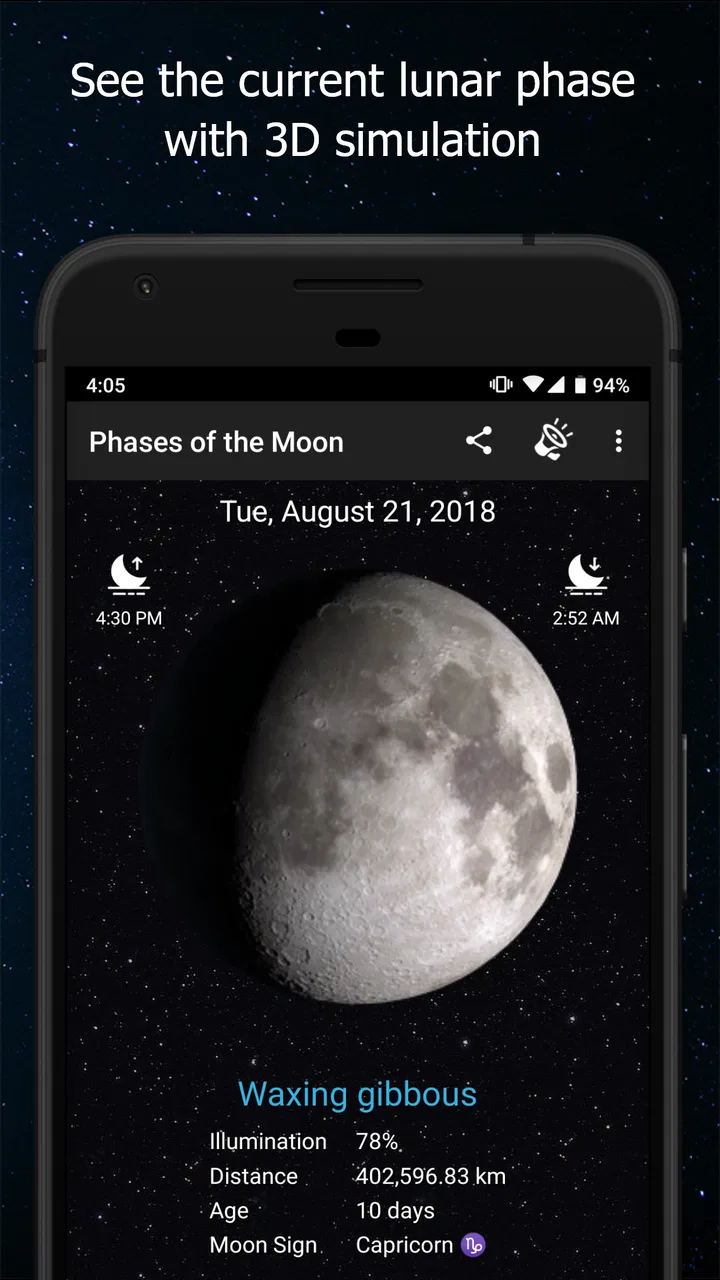
The app combines a moon phase calendar with a live wallpaper, a lunar widget, and a three-dimensional simulation. Those elements make it more useful than a single static phase icon. I can glance at the widget for a quick answer, open the calendar when I want to plan around a particular phase, and use the simulation when I want a more visual understanding of how the Moon changes.
I found that combination especially helpful because lunar information is easy to forget when it is hidden inside a general astronomy website. A browser search can tell me the current phase, but it requires a deliberate visit. A widget or wallpaper keeps the subject present without asking me to remember to look it up.
The right questions to ask before installing it
Before choosing this app, I would ask myself three practical questions. Do I regularly notice the Moon or plan evening activities around it? Do I like widgets and animated phone backgrounds? And am I comfortable paying for a specialized tool instead of using a free calendar or a general sky app?
If the answer to all three is yes, the focused design makes sense. If I only want the date of the next full Moon once in a while, a free search result or a broader astronomy application may be more efficient. The paid price is small, but the real cost is attention: this app earns its place when lunar information is something I want available every day.
The age rating also makes it easy to consider for a household device. Since it is rated for Everyone, I would be comfortable treating it as an educational visual tool for children, provided an adult handles the usual device settings. The three-dimensional view can make a basic explanation of lunar phases more concrete than a paragraph of text.
My first impression of the visual approach
The strongest part of the experience is the way it turns an abstract calendar into something I can see. A list of dates is useful, but the changing illuminated shape gives the information more meaning. The simulation is particularly helpful when someone understands the words “waxing” and “waning” but still struggles to connect them with the Moon’s appearance in the sky.
I would not call the presentation a substitute for a complete astronomy reference. Its purpose is narrower and more approachable. That narrowness is a strength for casual observation, though it may feel limiting to users who expect detailed information about stars, planets, visibility conditions, or a full night-sky map.
Where the app wins over a basic calendar
A normal calendar can record a date, but it does not naturally show the visual progression from one lunar phase to the next. Here, the calendar and the visual model work together. I can use the calendar for planning and the simulation for understanding, rather than trying to interpret a text-only reminder.
The wallpaper is another meaningful difference. I do not have to open the app every time I want a lunar cue. For someone who enjoys changing a phone’s appearance or uses the home screen as a quick information surface, that is more convenient than bookmarking a website.
The widget also changes the workflow. Instead of searching for “current moon phase” before going outside, I can look at the home screen while checking messages or the time. That is a small improvement, but it is exactly the kind of small improvement that determines whether an information app becomes part of a routine.
A realistic evening use case
Imagine planning a short walk after dinner with a child who wants to see the Moon. I could check the widget earlier in the day, open the calendar to understand where the current phase sits in the cycle, and then use the live wallpaper as a reminder that the Moon may look different from the last time we went out. If the sky is clear, the simulation gives us a simple way to discuss why the visible shape changes.
That workflow is more useful than opening a general weather app and hoping its astronomy section is easy to find. It also avoids turning a casual observation into a research project. I can prepare quickly, explain the basics, and then put the phone away.
Three less obvious ways I would use it
- Use the widget as a planning trigger. Rather than treating it as decoration, I would use the displayed phase to decide when to schedule a quiet evening walk, a photography attempt, or a simple outdoor lesson.
- Use the simulation when teaching the difference between appearance and position. The three-dimensional view helps separate the Moon’s changing illuminated shape from the idea that the Moon itself is physically changing form.
- Use the calendar to build a recurring observation habit. I would make a quick note of what I see outside at several points in the cycle, then compare those observations with the app’s visual progression. That turns a passive widget into a small personal project.
These uses are not about collecting more information than necessary. They are about making the information easier to notice and remember. That is where the app feels more thoughtful than a bare phase-date lookup.
Where the usual alternatives may fit better
A general weather app is the better choice when your priority is practical forecasting. It can usually serve the immediate decision of whether to carry an umbrella or change travel plans, while this app is centered on the Moon. I would keep a regular forecast app for daily weather and use this one alongside it only if lunar information genuinely matters to me.
A broad astronomy app may suit someone who wants a complete view of the night sky. If I want to identify constellations, locate planets, or explore objects beyond the Moon, I would look toward that category instead. The focused nature of this app means I am not paying attention to features I rarely use, but it also means I should not expect a full observatory in my pocket.
A plain lunar calendar can be preferable for someone who wants the least visual distraction. If all I need is a date and I do not care about wallpaper, a widget, or a three-dimensional model, a simpler tool may feel faster. The advantage here is the combination of formats; the disadvantage is that the combination may be more than a minimalist user needs.
Web searches are also a legitimate alternative for occasional users. Searching once before a camping trip costs nothing extra and requires no home-screen space. The trade-off is that the information is not integrated into a daily routine, and the visual learning element is less immediate.
What may frustrate you in daily use
The app’s specialization can become its main limitation. I would not install it expecting weather warnings, hourly forecasts, or a broad set of outdoor conditions. Calling it a weather-category app may create the wrong expectation if you interpret that label as a promise of conventional meteorological tools.
Live wallpaper can also be a matter of taste. Some people enjoy an animated or changing home screen, while others prefer a still background because it feels cleaner or less distracting. I would treat the wallpaper as an optional part of the experience rather than the reason everyone should buy the app.
Widgets are useful only when they fit comfortably into the home-screen layout. On a crowded phone, adding another information panel may not feel worthwhile. I would try the widget for a few days and remove it if I found myself ignoring it; the app remains useful through its calendar and simulation, but the widget is not automatically valuable for every user.
The rating of 3.5 suggests that the experience will not satisfy everyone equally. I would read that as a reason to keep expectations realistic, not as a reason to dismiss the app. A specialized visual tool can be excellent for one routine and unnecessary for another. The important question is whether its particular combination of calendar, wallpaper, widget, and simulation matches how I use my phone.
Understanding the cost of switching
Moving from a free website to this app is easy if I only want a quick answer, but the benefit is not simply “more data.” The change is from occasional searching to having lunar information placed where I already look. That makes the purchase worthwhile only when convenience and visual continuity matter.
Moving from a general astronomy app is different. I may lose breadth, but I gain focus. If I rarely explore anything beyond the Moon, this focused approach could reduce clutter. If I regularly use star maps or planet-identification tools, switching fully would probably be a step backward, and I would keep the broader app instead.
Moving from a simple phase calendar may involve a similar trade-off. The calendar alone may be enough for planning, while this app adds presentation and quick access through the wallpaper and widget. I would not pay for those extras just because they sound attractive; I would pay if I expect to use them repeatedly.
There is also a habit cost. Any widget or wallpaper becomes useful only after I incorporate it into my routine. I would start by placing the widget somewhere visible, checking it before one planned evening activity, and seeing whether the information actually changes what I do. That small test is more reliable than assuming the app will become useful simply because it looks interesting.
Who should choose it
I recommend it to casual sky watchers, families looking for an approachable lunar-learning aid, photographers who like planning around the Moon’s changing appearance, and anyone who enjoys having astronomy information built into a phone’s visual design. It is also a reasonable choice for people who want a dedicated lunar tool without committing to a much broader astronomy application.
I would be more cautious for users who need conventional weather forecasting, advanced sky navigation, or a strictly minimal interface. Those users may be better served by a forecast app, a full astronomy guide, or a basic calendar. This is not a universal replacement; it is a specialized companion.
My recommendation
After weighing the alternatives, I see Phases of the Moon Pro as a good small purchase when the Moon is something I actively want to notice. The calendar gives it practical value, the widget reduces the effort of checking, the wallpaper keeps the subject visible, and the three-dimensional simulation adds an educational layer that a plain date listing does not provide.
I would not recommend buying it solely because it appears in a weather category, and I would not expect it to replace a normal forecast or a comprehensive astronomy app. Its best role is narrower: a convenient lunar reference and a visual prompt to look up from the screen.
For me, the deciding factor is whether I want a tool I remember to use or merely an answer I can search for. If I want the former, the $1.99 price is reasonable, especially given the focused set of ways to view the Moon. If I only need an occasional phase date, I would skip the purchase and use a simpler alternative. Choose it for the habit of observing, not for weather forecasting.
FAQs for Phases of the Moon Pro
01What is Phases of the Moon Pro?
Phases of the Moon Pro is an astronomy app designed to show the Moon’s current phase and its changing appearance over time. It typically provides an illustrated lunar display, phase information, dates for upcoming phases, and additional details such as illumination and lunar age. It is useful for casual skywatchers, photographers, students, and anyone interested in following the lunar cycle from a phone or tablet.
02What features does Phases of the Moon Pro offer?
The app focuses on presenting the lunar cycle in an easy-to-understand format. Depending on the device and version, users can explore the current Moon phase, move through future or previous dates, view phase names and percentages of illumination, and check important lunar events. Some versions may also include notifications, calendar tools, location-based information, or an interactive visual model of the Moon.
03Does Phases of the Moon Pro work without an internet connection?
Many of the app’s core functions can generally be used offline because Moon-phase calculations and visual information do not always require a continuous connection. However, features that depend on current location data, online updates, advertisements, cloud services, or external links may require internet access. It is best to open the app once after installation and allow any requested data to load before relying on it offline.
04Is Phases of the Moon Pro accurate for planning observations?
The app can be helpful for checking the approximate lunar phase, illumination, and dates of major phases, making it convenient for general observation planning. Nevertheless, users should remember that precise rise and set times can vary according to location, time zone, elevation, and calculation settings. For professional astronomy, photography, or eclipse planning, compare the app’s information with a trusted astronomical source.
05Is Phases of the Moon Pro free to download and suitable for everyone?
Phases of the Moon Pro is presented as a premium-style astronomy application, but availability, pricing, and included features can differ between Android and iOS and may change with updates. Before downloading, check the store listing for the current cost, in-app purchases, advertising policy, permissions, and supported devices. The app is generally suitable for beginners, children with supervision, educators, and experienced Moon enthusiasts.
Pros
- Detailed lunar calendar with moon phases and illumination data.
- Includes moonrise
- moonset
- sunrise
- and sunset times.
- Useful widgets provide quick access to current lunar information.
- Smooth interface with clear visuals and easy navigation.
- Helpful for photographers
- stargazers
- and planning outdoor activities.
Cons
- Some advanced information may be difficult for casual users to interpret.
- Accuracy depends on correct location and device settings.
- The app may use noticeable battery while updating location data.
- Limited practical value if you rarely follow lunar or astronomical events.
- Paid access may feel expensive compared with simpler moon-phase apps.

Phases of the Moon Pro
Gallery